Tampilkan postingan dengan label Guest Post. Tampilkan semua postingan

Why a successful Email Campaign can boost your Business

Diposting oleh Greatest on Senin, 29 Agustus 2011

A successful email campaign is very important to making any business successful. If you want to start a business, then you need to build a client base. Of course, once you have established this list, you need to know how to best utilize it. The only way you can do that is if you get word out to people about the new product or service that you will be selling through your business.


This way, when you have updates about the launch of new products, added services, price discounts and other benefits, you can simply email the customers and they can all have the information in front of them. While there are other methods of advertising, this is by far the easiest, and in the modern day, will be the most successful.

Email Campaign for business

People are always checking their emails, whether it is on their computer or on their smartphones. If you can build a solid relationship with customers and make them comfortable enough to give you their email addresses, then you will have a chance to enhance your relationship to new levels. Instead of putting up flyers that people do not even notice, or advertising in newspapers and magazines that some may never read, it is better to approach the customer directly through an email campaign.

This way, for 5 minutes you will have grabbed their attention and will be able to get your point across. If you start a successful email campaign that gives information about new discounts, or about how your product or service is better than the competition, then chances are that you will increase the number of people who will come to your business.
Email Campaign

When people read an email advertising campaign, and they like what they read, then they will tell their friends or forward the email along which is definitely a sign of a successful email campaign. Another more accurate way of measuring a campaigns success is through analytics. This allows you to see exactly how the customer interacted with your email.

Whether they ignored it, unsubscribed, clicked around or forwarded it, you will have access to this information. Based on what you find, it will allow you to use the most popular aspects of each of your email in the future. Whether it is the placement of an “order now” button or a headline, you will get valuable insight into the mind and preferences of your customer.

All in all, the best email campaigns are the ones that have a simple call to action. They do not make too many offers, and they keep it short. But the message is always clear, and is something that the customer will appreciate. This way, you can use email and the Internet to grow your business and make yourself more successful.

This is a guest post by Olivia Smith. Olivia is a health, fitness and Internet marketing blogger. She is also a contributing writer for Invesp, a site which helps clients develop new conversation optimization techniques including creating and improved landing page design.
More aboutWhy a successful Email Campaign can boost your Business

QR Codes - Do They Really Work?

Diposting oleh Greatest

QR Codes - Do They Really Work?
Quick Response codes began as a novelty, but as the prevalence of QR code reading technology has increased, so has the popularity of their use. There is a short history behind QR codes but that has not held back the growing popularity of these little squares of black on white patterns.


The QR code was first invented in 1994 by developers at a subsidiary of the Toyota Corporation in Japan, and they were intended to provide an alternative to the barcode that could be read at a greater speed.

However, it turned out that the primary advantage of a QR code was that it actually could carry information such as text, pictures and url links imbedded within its blocks of pattern. Initially, the QR was a software used to entertain consumers by challenging them to decipher its codes through the use of a limited number of devices. In the early days, QR codes displayed in England and Japan were for attention getting purposes only.

The introduction of QR technology to the mainstream market has been waiting for an increase in availability of code readers in common place devices. That time is now.

QR codes
QR Code image containing this blog's homepage URL
QR code readers come standard in many Android, Blackberry and Nokia mobile phones as well as in the Nintendo 3 DS. This means that more and more people are starting to have immediate access to a reader via their pocket electronics. Now is the prime time to increase the distribution of QR codes to the masses. Even Facebook has recently added a QR code to every user’s home page. The technology is widespread and the code it self is becoming a familiar sight, but what can a QR code actually do beyond just looking high-tech?


As mentioned earlier, there is a wide array of information that can be contained in a QR code and an equally large array of outcomes that can be achieved when they are read. Scanning a QR code with a reader can produce different beneficial advertising results. The main advantage is that internet content can be transmitted immediately to the device. For example, contact information or product specifications and images can be immediately downloaded from a print location. To advertisers, this means website content can be added to magazine ads and public signs. These types of advertisements are common place in some countries, but American consumers are still lagging slightly in their common use of this technology.


This is a guest post by Olivia Smith. Olivia is a health, fitness and Internet marketing blogger. She writes about a variety of topics ranging from satellite internet service updates and SEO, to the latest in health products and fitness routines.
More aboutQR Codes - Do They Really Work?

How to Fix a Slow Windows 7 Computer

Diposting oleh Greatest on Sabtu, 27 Agustus 2011

Most people love using Windows 7. That’s because it’s by far the nicest and the most productive Microsoft operating system to date. But there can still be glitches, errors, and lags. The good thing about Windows 7 is that it has lots of tools to troubleshoot and repair a slow computer. Here is a guide to where to find them and how to use them.

1. Problem Steps Recorder

fix slow computer windows 7
Problem Steps Recorder is a great solution to get a detailed description of the problem, so that you can either review the report yourself or send it to a tech support team. Basically, this tool records everything happening on the computer that needs troubleshooting. It records all mouse clicks and everything that is pressed on the keyboard, takes screenshots, and then saves the report as a zipped MHTML file. This file can be easily emailed and analyzed. To enable Problem Steps Recorder, click on Start, type PSR and hit Enter. Then click on Start Record. To save a report, just stop recording your computer activity.

2. Troubleshoot problems

If something in Windows 7 starts behaving in a weird way and you have no idea why, go to the Control Panel, locate the “Find and fix problems” (Troubleshooting) option and you’ll be able to access the Windows 7 troubleshooting tools. They are easy-to-use wizards and can fix common problems, clean your system, check your settings, and lots more.

3. Discover bottlenecks

Under normal circumstances, Windows 7 easily outperforms Vista and XP. Nevertheless, your computer can still seem too slow from time to time. Most likely it’s an application or a process that’s slowing you down. Windows 7 makes it really easy to find bottlenecks with the help of Resource Monitor. Just click on Start, type RESMON and hit Enter to launch the tool. When it opens, click on the CPU, Memory, Disk and Network tabs to see which processes are hogging your system and using up your bandwidth. When you find the process that’s holding you back, you’ll be able to try to fix it right from the Resource Monitor. For example, if a process is locked up, right-click on it and select Analyze to see where the problem lies.

4. Repair your computer

If something goes seriously wrong and Windows 7 fails to start, it might be possible to repair your computer without the installation CD. Just boot your PC and press F8 during startup. You should see an option called Repair Your Computer. Select it and press Enter to see the recovery options Windows 7 has to offer.
These Windows 7 tools will help you troubleshoot and fix a slow computer in a quick and easy way. To prevent your computer from slowing down, use maintenance utilities like disk cleanup and defrag to keep your PC in top shape.

Author bio:

Guest post by Liz Cornwell. Liz Cornwell is an experienced writer who currently works for Auslogics Software. Auslogics makes software to speed up and clean up your slow computer.
More aboutHow to Fix a Slow Windows 7 Computer

Turning Leads into Customers

Diposting oleh Greatest

There are many different ways to turn leads and potential customers into actual customers, but what are they? How do successful people do it? And which tips and tricks work the best? One answer to these questions is to use lead management software. Lead management software uses different marketing techniques to turn leads into valued customers but, that is just one piece of the puzzle.

Some other tips that will help you to turn leads and potential customers into actual customers are listed here:


  1. Prioritize. Many agents do not do well because they fail to realize what the most important goal is. The most important goal is to get the appointment so that you can make the pitch. Before you can make a pitch and show people your great product you have to get an appointment. So first, focus on getting appointments, then focus on the pitch.


  2. Create a powerful first impression. First impressions are very important. The way you present yourself and the product will determine whether or not you have leads or clients. You have to give the people what they want, spell it out in a simple, informative and fun way that will make you and your business or product more interesting.


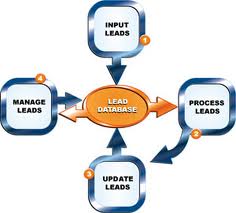
  3. Leads Into Customers


  4. Know the different kinds of leads. There are different kinds of leads, the ones who want to buy right away, the ones who want to buy in the near[ish] future and those who want to wait a while. Know each type of lead and have a game plan set up for you that maps out how you will act and deal with each different lead.


  5. Do the smart stuff. Doing the smart stuff really just means that you do what you would expect someone else to do. For example, if someone came up to you and presented something, you would expect them to call back quickly. You would expect those people to listen carefully when you wanted to voice an opinion or ask a question. You would also want them to respond to what they hear you saying. One last thing that falls under doing the smart stuff is to make sure you go and do some research beforehand. Researching a client beforehand, shows that you care and that you’re trying to make it work for them.

One last tip that was somewhat touched on at the beginning is to use technology. Lead management software is a good one, but there are lots of other things you can use technology wise that will help you turn leads into clients.

This is a guest post by Madison Hewerdine. Madison is an author who specializes in lead management software and has a passion for singing.
More aboutTurning Leads into Customers

BlackBerry Launches Social Music Service

Diposting oleh Greatest on Jumat, 26 Agustus 2011

BlackBerry Launches Social Music Service
Blackberry has just launched a new music service that will let BlackBerry users share and discover new tunes with their friends through BlackBerry Messenger. It is an attempt by Research in Motion to improve its BlackBerry Messenger service to compete against Apple and Android. BlackBerry smartphones do not offer a RIM-enabled way to buy music, although audio and other files can be loaded onto the devices from a computer.


Over 5 million people use BBM, which allows BlackBerry users with data plans to pass text messages, pictures and other files to each other without incurring charges from their network carrier. Now added to this is a global music sharing service.

BlackBerry Social Music Service

BBM Music is a cloud-based music service where BBM users can share music as well as find new music through a community based library. With BBM Music all BlackBerry Messenger users can build a personal music profile with up to 50 songs. You can refresh your profile by swapping out up to 25 songs each month. Up to 50 tracks from your personal profile are shared with your BBM Music Community, and each member of your community can share up to 50 songs from their profile with you. So with each friend that is added to BBM Music, you grow your music collection, since the songs from their profile become available to you. In other words if someone has 30 friends on BBM Music and each of those friends is sharing 50 tracks, the user’s total BBM Music library will have 1,550 tracks.

Users can select music from a catalog with millions of songs from leading music companies, including EMI, Sony Music Entertainment, Universal Music Group, and Warner Music Group.

In addition, you can also check recent updates of all users within your community. This is possible by viewing the app where you can see a visual timeline that shows the recent updates. The apps give you a chronological view of community updates, including who added new friends and which songs were added or removed. You can create multiple playlists from music in your profile as well as all of your friends’ profiles, and you can see which friend contributed each song while it plays. The apps also offers a great tracking feature where you can also comment on a friends' songs and playlists and keep track of how many friends are listening to your music.
Users have access to full tracks and can listen to music offline i.e since music can be saved to phones for offline listening it allows users to access songs even when they don’t have wireless coverage.

Your music profile is accessible with all of your friends on BBM that join BBM Music. What remains to be seen is that whether this added service is convincing enough for users to buy Blackberry smartphones as an alternative to Android or iPhone. The social music service surely makes their phones better than Android or iPhone alternatives.

This is a guest post by Catherine Jones. Catherine writes for www.toyotaplace.com. She enjoys content and writing about the social sphere.
More aboutBlackBerry Launches Social Music Service

Blogging Tips: 5 Ways to Get More Leads

Diposting oleh Greatest on Rabu, 24 Agustus 2011

A lot of online entrepreneurs seem to be having trouble finding potential customers who will buy their services or products nowadays. Well, the main reason behind this problem is the fact that most of these entrepreneurs do not generate a lot of leads through their blogs. Although having leads on social networking pages is good, blog leads are actually much more powerful in the online world.

1. The first thing you need to do in order to generate blog leads would be to find out who your target audience will be. After all, they are the ones who will influence your work in the long run. So, before starting your marketing campaign, try to figure out who you want to market to, and think about their problems and goals.

2. The next thing you need to do is uplift and update your blog. If you want to turn your blog into the main hub where people can find you, then you have to make sure it is always at its best - remember that. If you want to attract even more people, one good suggestion would be to give out free gifts in exchange for their personal information, like their names, phone numbers and email addresses. E-books, video tutorials and reports would be great freebies to give. Just make sure that your target audience will find them useful.

Blogging Tips to get More Leads

3. Of course, having a blog in itself will not do you any good unless you create valuable content, too. So, once you have targeted your market segment, pick out several of their most urgent problems and try to get certain keywords from them. Then, do some research on how to directly drive traffic from online search engines onto your blog through these keywords. Ideally, you should focus on long-tailed keywords, though, since they won't have as much competition out there as short-tailed keywords do.

4. Once you find several good keywords to use, it would be time for you to create valuable content for your blog. Be unique and make sure your content is always valuable. If you succeed at doing so, then you will never have trouble getting blog leads anymore since your customers will just keep coming back on their own - believe it.

5. If you want to get even more traffic later on, then you can try getting several backlinks, too. Just comment on other people's blogs or submit your own onto various search engines to get them.

Yes, with all of the methods mentioned above, you will have no trouble generating blog leads in no time and building up a list of customers out of them. However, you shouldn't forget to build relationships with your new customers, either; they are sure to appreciate it. Good luck!

This is a guest post by Jenny Parker. Jenny is a writer that focuses on blogging, internet marketing and social media. She also enjoys covering topics on an expat community blog that provides prepaid calling cards and swiss calling cards for international travelers. Take an additional 10% off with coupon code "acc10".
More aboutBlogging Tips: 5 Ways to Get More Leads

Discover New Blog Post Ideas with Google Analytics Data

Diposting oleh Greatest on Sabtu, 20 Agustus 2011

Anyone who has kept a blog for some time or who writes for a living has likely experienced that feeling of no inspiration. There’s absolutely nothing left in the tank – even all the rubbish ideas have been used up and you are left feeling unmotivated. It is at this point that sometimes blogs can get abandoned, as constantly thinking up new ideas is hard work and tiring.

My first stop when I get to this stage is usually Google News. Just having a read through some of the top stories can trigger a hook to link one to the theme of your blog, and if you optimise properly, you could even get on top of some of the traffic for that particular story. It is easier said than done, however, and there aren’t always big stories around that are relevant.

Google Analytics
What I prefer to do is rely on Google Analytics to work as my inspiration on those uphill days. Chances are you will be getting some longtail traffic in to your blog. If you aren’t, you may need to work on your blog’s optimisation a bit before this technique is useful. By scrutinising your longtail traffic and understanding the terms people are actually using to reach your blog you can get some innovative ideas as to areas to plan your next blog posts around.

So to look at longtail traffic in Analytics you need to go into the Traffic Sources -> Keyword report (or Traffic sources -> sources -> search -> organic if you are using the hideous new version of Analytics). Go to page 10 of referring key terms and have a poke about to see what’s in there. Chances are there will be some quite interesting terms.

For example, a quick look at a random sample of my referring key term report reveals that there could be good mileage in blog posts about cartoon audio effects, music for schools, thunder sound effects and tire skid sound effects. These base ideas can be expanded into popular/entertaining/ interesting topics – best cartoon sound effects, most impressive tire skids in films, top 5 thunderstorm scenes in films, teaching with music in school. Sometimes you hit the jackpot and come across an idea that can be extended into a series of blog posts.

The joy of using this technique is as your blog grows stronger and starts ranking better for more longtail traffic, you will get even more inspiration delivered straight into your Analytics. Obviously you do need to continue using your own ideas to mix it up a bit and keep on top of trending topics but I highly recommend Analytics for those slow days.

This guest post was written for Tweak and Trick by Alex. Alex writes about a range of topics online, including music for TV and production music.
More aboutDiscover New Blog Post Ideas with Google Analytics Data

Running a Blog with your Website

Diposting oleh Greatest on Kamis, 18 Agustus 2011

Many companies now have websites, be it a small website that just shows their location and contact details, or a very large information based site, or all singing and dancing shopping cart solution with thousands of items available to order online.

Yet, many companies are reliant on their web designer or a web development company to keep these sites up to date and implement changes that a customer may want them making to their site. Now this is not down to the web company just wanting to make more money, it is down to the fact that a little knowledge can cause a lot of damage, and if you had full access to your site then with a few misplaced clicks, you could cause terrible damage to your website, which your web design company would then have to charge to put right. So, most websites are limited in how you can update them for a good reason.

There is a growing tendency for companies to want to provide daily or weekly updates on their day-to-day business, such as a new product launch, or a new store opening, or an industry accolade that they may have won. If this sounds like you, then how do you go about displaying such information on your website without having to go to your web design company each time?

Blog

Well, the simple solution is to get your web development company to design and set up a blog for you. Whilst this does sit on the same server as your website, it is in essence a separate area that you can go in to and update your information (such as new product releases, company news etc.) without having access to any of the files for your main website, thus ensuring one wrong click of the mouse does not result in your whole website going down!

Blogs are just about the best thing going for you to get the latest information across to your customers, as once they are set up, it is very easy to go in and post your latest company news on a daily basis, and the more you post fresh, original and relevant content to your blog, the more likely you are to move your whole website rankings up in search engines.

This is because major search engines love new and original content (not just some article that you have copied from another website), and in general, this is what blogs give to search engines. Yet make no mistake. It can take hard work to take your blog to the top of the search engines, particularly when anyone can set one up for free in under two minutes.

However, whilst setting up a good looking blog need not cost the Earth, you do need to maintain it regularly, as a poorly maintained blog can do your website more harm than good.

So, if you have not got a blog set up on your website already, then why not talk to your web development company today about implementing one for you. A good one will even offer a fully managed service for you if you are too busy to manage it day to day.

This is a guest post by Andy on behalf of Web Design Kent from TME Solutions which is a family-run web design and development agency in Maidstone. TME helps businesses grow online with online marketers and consultants happy to help see websites expand and thrive every step of the way.
More aboutRunning a Blog with your Website

The Basics of Lead Management Software

Diposting oleh Greatest on Rabu, 17 Agustus 2011

Lead management software is any technology that helps businesses seek out, obtain and manage sales and marketing accounts. Lead management can range from a method used to create new business to the process companies use to direct their customer relationship strategies.

As a faction of the broader customer relationship management industry, the lead management software itself enables businesses to efficiently manage their leads by creating structures for customer inquiries, data organization, and sales processes. With the overall goal of increasing revenue, companies implement lead management software to streamline their sales tactics thereby targeting more likely potential customers.

Lead Management Software

Lead management goes hand-in-hand with brand development and marketing management as companies that implement software to organize leads have an end goal of targeting more focused customers and generating more sales overall. By monitoring customer relationships, lead management software helps to complete sales in a more efficient manner by establishing practices that provide connectivity between marketing and sales departments.

Lead management software can enhance an organization’s ability to get data from customer interactions. It is all about communication, lead management software can help organizations to better manage customer interactions, amass greater business deals, nurture leads, and more.

These are some of the basic advantages of lead management software:

  1. Updates information directly. Lead management software enters data and keeps it up to date frequently so that it does not need to be done manually.

  2. Lead management software tracks and analyzes avenues of advertising and marketing. It helps you to figure out what needs improvement and what avenues are being most effective.

  3. The software can customize and distribute to sales reps automatically, which can help turn potential sales into actual sales.

  4. The software can also be used to ensure uniformity. The software can use uniform methods to keep high standards with follow-ups that can lead to more sales.

  5. The software can also track lead information to determine its quality and potential.

  6. The software keeps track of history in order to keep up good relationships. It will also inform sales reps of the next step to take in the sales process.

  7. The lead management software can save time because it is maintaining lead information. The time usually used for all the things the software does can be used to maximize selling time.

  8. The software helps eliminate disorganization and the loss of leads. The oversights that usually allow those things to happen are decreased so it is easier to keep track of leads.


This is a guest post by Madison Hewerdine. Madison is an author who writes about lead management software and has a passion for singing.
More aboutThe Basics of Lead Management Software

7 Wi-Fi Tweaks to Boost Your Speed

Diposting oleh Greatest


Chances are if you have a wireless internet connection at your home, you have had some trouble with the speed of the connection at least once before. That being said, a slow wireless connection can be frustrating to deal with. You are probably paying good money to your internet service provider, so slow speed is something you should not have to deal with, right? Well, the truth is wireless speed can be affected by a number of things. Luckily there are some Wi-Fi tweaks you can try that should help boost your speed and get you rolling in no time.


1. Reposition Your Router


The position of your wireless router plays a major role in the speed and strength of your wireless connection. If you are having trouble, you should try to reposition your router in a centrally located area, where the signal can equally reach each wireless device in your house. If your router is near an outside wall, try to move it closer to the middle of your house. Routers that are placed near outside walls can send some of the signal outside, which can risk your wireless connection’s strength and speed.


2. Purchase a Wireless Signal Repeater


Adding a wireless signal repeater to your home network can greatly increase the speed of your connection. A repeater works by extending your signal without having to add any additional wires. All you have to do is simply place the wireless repeater in a location that is between your router and your wireless device(s). It will instantly boost the wireless signal that is sent from the router to your devices, meaning faster speeds for you.


3. Install a New Antenna


Most wireless routers come standard with an omnidirectional antenna, meaning it broadcasts the wireless signal in a circular radius to reach various places in your home. If your router is in a perfectly centered location between all of your wireless devices, this is probably fine. But if your router isn’t perfectly centered among devices, you should think about replacing the existing antenna with a stronger one, known as a high-gain antenna. You can usually remove your old antenna and replace it with one of these stronger antennas to boost your signal strength, therefore increasing the speed of your connection. Another perk of a high-gain antenna is its ability to focus the wireless signal in any direction you prefer.


Increase Wireless internet Speed


4. Use One Brand of Equipment


You may not think that using different brands of equipment can reduce the speed of your wireless connection, but in reality it can. If you use different brands of equipment, your components may not work as efficiently. This is because many manufacturers of wireless networking equipment pre-install enhancements in all of their products. These enhancements can boost speed, but will only work if products from the same manufacturer are used simultaneously. If you are using various brands of equipment and your speed is suffering, this is definitely worth a try.


5. Reduce Frequency Interference


Many household electronics, such as cordless telephones and baby monitors, run at the same frequency as wireless routers. This means that these electronic devices can interfere with the wireless signal that is being broadcast from your router, which can affect the speed and performance of your connection. Check the box of your router to see what frequency it runs at, and try to avoid using other electronic devices that operate at the same frequency. You can also try to change the channel on your router to avoid frequency interference.


6. Check for Firmware or Driver Updates Regularly


The manufacturers of wireless routers and network adapters often release firmware or driver updates that can improve the function of your wireless connection. You can find and download these updates at the manufacturers’ websites. Updates are usually done to fix issues, add features, and strengthen your equipment’s performance. Check for these updates on a regular basis to make sure your firmware and drivers are always kept up to date.


7. Secure Your Wireless Network


If your network is not properly secured, neighbors could be using your signal. This can reduce the speed of your connection because you are in a sort, sharing the wireless signal. Set up secure passwords and some sort of wireless encryption that will prevent anyone else from accessing your wireless network. All of these Wi-Fi tweaks can greatly boost the speed of your wireless connection. If one of them does not seem to do the trick, try another or even a multitude of options. It may take a little time and patience, but once you figure out what works to speed up your connection, you will be happy you put forth the effort.


Guest post from Karen Schweitzer. Karen writes about internet service for InternetService.net.

More about7 Wi-Fi Tweaks to Boost Your Speed

Facebook's Recent Updates: Trying to fight off Google Plus

Diposting oleh Greatest on Selasa, 16 Agustus 2011

Gone are the days that Facebook was only available to college students. More and more people are joining daily and it seems the average age range is spanning in both directions. Users are now creating profiles at younger and older ages than ever before. So when it comes to social media, Facebook is king right? Well they are sure putting up one heck of a fight to stay on top.


Facebook vs Google Plus

Most recently, Google Plus had come along the social network scene giving Facebook a run for its money. What seems to attract many people to Google Plus is that it's the “shiny new toy,” so to speak and it seems to be more simplistic, and perhaps more intuitive, in its layout. As a result of these factors, Google Plus appears to be drawing in more users than other social media networks and really, should we be surprised? It seems Google has got a handle on doing a thing or two right when it comes to gaining a following.

So is this the beginning of the end for Facebook? Will it be similar to what Facebook did to MySpace?

Well, Facebook has been noticing this brand new social network rising up from the shadows, and as its result, it seems to be stepping up its game by creating some recent updates that will possibly fight back against its social media rival. Get ready ladies and gentlemen, the boxing gloves are on.

Google Plus Facebook Like

One of the most notable recent Facebook updates planned is the addition of an online video chat feature which will be integrating the same properties of Skype by adding the Skype Online Chat client function. While Google Plus also has this feature with multiple people chatting in one conference, Facebook plans to allow only two people converse in a video chat. Is this a strength or a weakness? It’s likely that time will tell when the results begin filling in. Many people are hoping that Facebook will raise the cap amount to more than two people in a single conference. While it hasn't been announced that Facebook is planning to raise the amount anytime soon, I guess only time will tell.

Another recent update is that Facebook has also added another new feature called Group Chat.

With the Group Chat feature, users can send a private message to as many friends or family that they want to communicate in a group without either starting up a new message for each friend or family member or even having to sign into Facebook's Instant Message feature. The Group feature is also great for starting up meeting appointments and many other tasks. This brand new feature has become a very popular and most used accessory in this social media platform to many.

Google Plus
These two updates seem to be the only real effective and recent updates that Facebook has announced, but as each day passes, it appears that Google Plus is beginning to dominate the competition altogether.

While Google Plus is slowly planning on adding new features in the possible future, who knows how the war between Facebook and Google Plus will really go down. But then again, don’t we all appreciate seeing an epic battle every now and again.

This is a guest post by Olivia Williams. Olivia Williams is an Internet marketer and a contributing writer for amazingdomains.co.uk, which offers a variety of domain names for purchase for businesses or personal websites ranging from weddings to shopping and home domains
More aboutFacebook's Recent Updates: Trying to fight off Google Plus

Health Tips for Bloggers: Stay Healthy While you Blog

Diposting oleh Greatest on Senin, 15 Agustus 2011


Sitting most of the day is not good for your health. Experts say it is better to stand rather than sit while you go about your daily work. This usually means raising your computer monitor to eye-level, and elevating the keyboard and mouse to a height that is easy to use from a standing position. This has led to the growing trend of creating “standing office workstations.” However, there are other things bloggers can do to counteract the effects of sitting all day.


You are what you eat


Your diet is important. If you spend most of your time sitting down, you may be gaining fat. Schedule meals on your calendar, and treat them like any other appointment. This prevents binging on fast food. In addition, prepare your own food, so you will know what is in it. Drink loose-leaf tea, which is better for fat-loss than coffee. It is also good for increasing energy levels. Control the amount of snacks you eat during the day.


Avoid snacks with starches and sugars.


With the multitude of sites and apps concerning calorie counting, maintaining your weight and making sure you eat the right things couldn’t be easier. If you don’t want to stretch so far as to be counting calories on a regular basis, simply being careful and not opting for that regular unhealthy snack can make a big difference to a blogger’s wellbeing.


Back problems


How to stay Healthy Blogging

Prevent back problems with the following tips. Get a chair that lets you put your feet on the floor while keeping your hips and knees level. Use a footstool to accomplish this, if necessary. Every half hour get up and go for a short walk. This is also a convenient time to drink some water, so keep a bottle nearby. Drinking water will help you to be more alert.


Exercise at your desk


Here are a few exercises you can do at your desk. To stretch the back, roll your shoulders backward in a circle a few times and then relax. Stretch your neck every so often by looking right and left. Tilt your head from side to side, then backward and forward. The more adventurous blogger should consider getting an exercise ball to use as a chair. This will help to keep your spine in proper alignment. You will find that it is easier to do stretching exercises when sitting on one of these. Also, it’s a good idea to stretch your hands and fingers in between all that blogging!


Go for a run


It’s a new fad that seems taking off in offices around the world. You can go for a job during your break or maybe even at the end of the day around the office block. It helps if there’s a shower at your work though!


Other health issues for bloggers


Lessen the possibility of getting headaches and eye irritation. Every 30 minutes or so, look away from your computer screen. Focus on other objects in the room. It could be anything, a clock or a desk, for instance.


Pay attention to your oral-health. Prevent gum disease by brushing and flossing your teeth carefully. Gum disease is four times more prevalent in smokers than in non-smokers. Tobacco use of any kind will increase the risk of gum-disease, so try not to skip out and have a cigarette.


Making a few basic changes as suggested above can go a long way toward keeping bloggers healthy. Things such as scheduling when you eat, drinking water, making sure your chair is ergonomic and doing various exercises at your desk can be easily included in your work routine. Get started today for a healthier tomorrow.


This is a guest post by Richard. Richard is a freelance writer who produces content related to health and technology. He mainly writes on issues related to cosmetic dentistry. Pay him a visit at @thefreshhealth.

More aboutHealth Tips for Bloggers: Stay Healthy While you Blog

What Bloggers need to know about Google PageRank

Diposting oleh Greatest on Minggu, 14 Agustus 2011

PageRank or PR is by far the most common measure of the quantity and quality of links leading to a particular website. It usually appears as a whole number from zero to 10, with all new sites starting off at zero and only the biggest of the giants getting the full score. Google.com has PR10 but Youtube.com only gets PR9.

A well-established, reasonably popular blog that has put some effort into publicity and link building might end up with a PR3 or PR4 homepage, but for anything beyond that, a long-term, focused campaign usually has to be mounted.

The greater your PageRank is, the better, but why? It's because PR is a simplified version of the measure Google uses to decide how much authority a website has, and hence how highly it should rank for relevant search terms. The greater your PR, the more chance you have of getting a good stream of organic traffic through search engines.

How can I see my site's PR?
There are plenty of free toolbars that will let you see any site's PR. It doesn't have to be your own.

Increase Google PageRank


What increases PR?
Good quality inbound links will improve your site's PageRank. That means links from other blogs (try guest posting), from high quality directories, informational sites, and from forums.

Links come in two varieties- nofollow and dofollow. Most links on ordinary sites are dofollow, which means Google takes them into account when calculating PR values, but some sites choose to make links nofollow, or ignored by search engines, in order to prevent spam or to help direct their link power carefully. Links placed in forum comments are often nofollow, as are links from Facebook and WikiPedia. These links may count in other ways, but if you're looking to increase PR it's best to stick with dofollow links.

The bigger and more trusted the website, the more a link from it is worth. The most valuable link most small to medium sized sites can hope to get is from the human-edited directory at dmoz.org, but they are quite picky. Your blog would have to be a good information resource to make the cut.

Note from Akhilesh: Dmoz has lost the trust that Google used to give to it in 2003-2004. Now, Google treats Dmoz the same as it would treat any other website with the same link profile. Since Dmoz has such an excellent link profile, a link is still useful.

What doesn't increase PR?
If you wouldn't use a directory to find something yourself, listing your site on it probably won't help you. 'Link farms'- sites that are nothing more than pages and pages of links- will not help you, and may in fact do your site serious harm.

Never trust anyone who offers to sell you thousands of links. The major search engines are pretty good at spotting link fraud and being involved with it can get your site blacklisted off the rankings completely. Simply exchanging links with another site is of limited value. A one-way backlink is much better if you can get it.

Why isn't my PR going up?
If you've been putting a lot of work into linkbuilding but your PR is still zero, don't worry. Publicly visible PageRank values are only updated every few months, and the next time this happens you might see a dramatic jump. You can't see it, but the version of PR used to generate the rankings on search engine results pages is updated constantly so linkbuilding efforts will help your rankings almost immediately.

Note from Akhilesh:Google has repeatedly stressed that PageRank is not the only factor involved in Google's algorithm.There are more than 200 factors that Google considers while ranking web pages.

This is a guest post by Jess Spate. Jess Spate works as an SEO consultant for sell my timeshare and outdoor activity websites.
More aboutWhat Bloggers need to know about Google PageRank

Which Website Platform Is Right For You?

Diposting oleh Greatest on Sabtu, 13 Agustus 2011


There are many free platforms out there and each has its own pros and cons. However, many of these platforms aren’t bad by any means of the word.  Instead chances are that some of these platforms are specialized and work best with certain types of sites.  So to help you in deciding which platform to choose, I am going to break down 3 popular free web design platforms and tell you what type of site they would be best for.


Blogger: Google’s Blogger is one the best blogging platforms. It’s simple, easy to use, and you can easily build a community and customize the look and feel of your blog.  There are tons of tools and widgets you can add in to improve it, but even the basic layout is great. All your posts will automatically have a share feature and you can embody pictures, text, and videos into all your posts.  This platform is best for someone who either wants a personal blog, in which they just pretty much write about whatever they want, or a niche blog in which they focus on a particular topic. This blog is also powered by Blogger.


Blogger as a Blogging Platform


Wix: Wix is a free web design platform and it really caters to the more creative types. Being entirely flash based, Wix allows creators to adjust every picture, piece of text, and other site element to their liking.  However, Wix’s page managing isn’t its biggest asset. It also doesn’t really offer a true blogging platform. So with that in mind, Wix is ideal for people who want to showcase creativity. This would mean musicians, artists, photographers, really anyone that is trying to show off an artistic ability. These types of sites wouldn’t need a lot of pages, and chances are that artistic people will have a great time in the Wix editor. Wix could also be great for small business owners that offer a service. However if part of your business is selling things online, then I wouldn’t choose Wix.


Wix as a Website Platform


 Weebly: Weebly is the platform I use for my site and I love it. Unlike Wix, page management is Weebly’s strong point. You can have as many pages as you want on your website, and also as many blogs as you want on your website. This is great for someone who wants to create a multi-blog site or really any site that is going to be very content driven.  This is also another option for small business owners, but if you are mainly into selling things online then Weebly is a much better pick than Wix.


Weebly as a Website Platform


So hopefully now it will be easier for you to pick a platform rather than just going out and trying a bunch to see what you like.


This is a guest post by Kavyon Ghoreshi. He writes at SiteUnleashed. For more web design resources, check out his website at http://www.siteunleashed.com/.

More aboutWhich Website Platform Is Right For You?

Should You Be Interested in Cloud Computing?

Diposting oleh Greatest on Rabu, 10 Agustus 2011

The expensive cost of hardware and software drives up infrastructure and operation (I&O) expenses for most businesses. Many businesses are looking for different strategies to help cut down the I&O expenses. One of the fastest growing technology trends that can potentially reduce I&O expenses for businesses is cloud computing.

Save money with "Pay-as-you-go"

Cloud computing adopts a "pay-as-you-go" model, which allows business to pay only for the storage capacity that they use. This model provides very little up-front cost compare to setting up and maintaining an in-house infrastructure. Businesses can start out by renting a small amount of storage, and then increase the storage capacity as required. The idea behind the "pay-as-you-go" model is to allow businesses to adopt cloud computing quickly. Businesses will see an immediate return on investment (ROI) after migrating their infrastructure to the cloud.

Cloud Computing


Save money with "Outsourcing"

For maximum cost savings, most businesses will outsource most of their infrastructure components. By moving their infrastructure to the cloud and hosted by third-party cloud providers, businesses will experience a tremendous decrease in operation cost associated with IT staffing and hardware maintenance. Traditionally, businesses require a high number of IT professionals to take care of the day-to-day infrastructure maintenance such as installation, upgrades, and continuous enhancements. The number of IT staffs can greatly be reduced as more infrastructures are moved away from the traditional model and into the cloud.

Migrate to the cloud only when it makes sense

Advantages of Cloud Computing
Cloud computing offers a wide range of solutions that include Infrastructure-as-a-Service (IaaS), Desktop-as-a-Service (DaaS), and Software-as-a-Service (SaaS). The technology department is responsible for evaluating which one of these three components should be adopted based on the business requirements. For example, IT needs to determine the number of users that require desktops, the number and type of software applications, and the infrastructure components that are currently supported by the cloud. Businesses also need to research and evaluate the different cloud providers and cloud solutions. Standard office applications such as word processing, spreadsheets, and collaboration tools are offered by Microsoft Office 365 or Google Apps.

Another requirement that businesses should carefully evaluate is the mandatory federal and state regulatory and compliances. A financial institution will have stricter compliances to follow than a software development firm will. The reason for this is that financial institution contains more sensitive data than other type of businesses. As a result, financial institutions will have stricter guidelines when it come to moving their data to the cloud.

Less power equals more savings, and the go green factor

Whether the cloud is internally hosted or outsourced to third party cloud providers, businesses will save money on energy either way. Cloud computing is much more energy efficient because there are fewer servers and network equipments that are required to operate. In addition to saving energy costs, businesses are also contributing to a healthier planet by leaving a smaller energy footprint.

Author Profile

This is a guest post by Keith Barrett, who as a cloud computing analyst, looks at hosted desktop applications and their use in business environments.
More aboutShould You Be Interested in Cloud Computing?

Eyesight Tips to help Bloggers with their Eye Problems

Diposting oleh Greatest on Selasa, 09 Agustus 2011

Bloggers by their nature sit in front of a computer screen for large parts of the day and blog. If they didn’t do this, then they wouldn’t be bloggers! I think most people would at least have some idea that spending excessive amounts of time staring a computer screen is not exactly ideal for your eyes! OK, so just how true is this and is there anything I can do to at least minimize the effects of spending so much time glued to the screen?

The first thing to say is that your eyes are there to be used. If they weren’t, you wouldn’t have them, simple as that. The second thing to say is that you cannot wear your eyes out or damage your eyes in anyway by spending time in front of the computer screen. Fact!

Bloggers who are reading this are probably at this very minute breathing a huge sigh of relief as they are contemplating their eighth straight hour in front of their laptop! However, although I say this, staring at a screen sitting all day is almost certainly to give you eye strain amongst other symptoms.

Eye Relaxation

Below are the most likely eye related symptoms bloggers can have. See how many of them you say yes to:=
  1. My eyes sting when I blink after staring at the screen for a while.
  2. My eyes feel itchy and gritty and I find myself rubbing them a lot.
  3. I get a frontal headache/ache around my forehead and between my eyes.
  4. I get a dull ache behind my eyes.
  5. My distance vision seems blurred when I look up from my screen.
  6. My vision seems blurred at night when I’m driving home from work.

Now, give yourself a score out of 6. I guess most of you will probably take maximum points here and score 6 out of 6! OK so you scored 100% but remember, this is not something to be proud of; the best score possible was zero! So what can be done about it? Are there any tips that can help my blogger eyes? There sure is and below are my top 5 tips to help you reduce the amount of symptoms you get:

1. Get your eyes tested: One of the reasons you may be experiencing all those symptoms is because you might need to wear glasses or contact lenses. Our vision tends to change very slowly, meaning things could be out of focus without you actually realising it.
Eye Relaxation Tips for bloggers
2. Take enough breaks: Ideally you need to have a five minute break every hour that you are on a computer screen. And a break doesn’t mean watching the TV or reading for five minutes! When you are taking a break, try to look into the distance for as long as possible as it helps relax the muscles in your eyes.

3. Don’t stare, blink: Try to make sure you blink regularly. When we are staring at a computer screen we only tend to blink about half as much as we normally do. Blinking helps provide your eyes with oxygen and also gets rid of any dust etc that can blow into your eyes. Not blinking enough is the reason our eyes can feel gritty and sting sometimes.

4. Avoid Glare: Make sure you don’t have any reflections in your computer screen. It makes it more difficult for your eyes to remain focused and is likely to give you a headache.

5. Keep your distance: Don’t sit too close to the computer screen. Sit back from your computer as much as you can as this will mean less exertion for the muscles in your eyes. The closer the distance you are looking at something, the greater the muscles have to work in your eyes. If you find sitting further back from your screen means you can’t see it as well, then you can always increase the font size.

In summary, sitting nonstop in front of your laptop is not going to do your eyes any harm but it may leave you with eye strain and a bad head! Follow these simple pieces of advice and you will probably find you can blog more comfortably than you are at present.

Bio
This is a guest post by Tim. Tim is the co-founder of a Treatment saver, a Health comparison website specialising in laser eye surgery. He also enjoys blogging and regularly writes for his Treatmentsaver Blog which covers topics ranging from and laser eye surgery risks to laser eye surgery cost.
More aboutEyesight Tips to help Bloggers with their Eye Problems

Use Long tail Keywords to Boost Blog Traffic

Diposting oleh Greatest on Senin, 08 Agustus 2011

Keyword research is one of the fundamental parts of any search engine optimization strategy. Before you start trying to get to the top of the search rankings, you have to decide which search terms you want to rank well for. Ideally they should be relevant to your topic, so searchers find what they were looking for, popular enough to bring in a good stream of traffic, but not so competitive that ranking well is impossible.


Most bloggers and webmasters who do keyword research aim to find opportunities where the search term is fairly popular, but not fiercely contested. The idea is that it's no use trying to rank well for 'san diego hotels' because some very big players target that keyword and it's going to be very hard to rank well for it, and it's no use putting all your time and effort into ranking well for 'cheap dog friendly san diego hotels' because capturing the top spot won't do you much good. Very few people will search for that phrase.

Long tail Keywords Increase Blog Traffic

But what if you don't focus all your efforts on that very specific keyword? What if you do the minimum amount of work required to rank well for that phrase (if it's not very competitive it won't take much work), then do the same for 30 more like it? Each one may not bring in much traffic alone, but between them they could supply a healthy stream of visitors. The total amount of work required to rank well for 30 easy keywords could still be a lot less than what you'd have to put in to rank well for one very strong keyword.

That's the principle behind 'long tail' keywords. They aren't popular but they are easy to rank for, and if you get enough of them, they can bring in plenty of visitors.

It's not just a clever way of boosting the number of arrivals either. It's very clear what someone searching for 'cheap dog friendly san diego hotels' wants. If you can provide a page that contains that specific information, you'll have a good chance of making that visitor very happy. They'll be far more likely to click on an affiliate link, sign up to your newsletter, or even just spend a lot of time on your site than someone who arrived through a more general keyword and didn't find exactly what they were after.

Blogs are ideal for targeting long tail keywords. You have the freedom to write each post on a very specific topic and can add as many new, diverse pages as you like- something that can make sites with a more static architecture look cluttered and untidy.

You don't need to focus your whole strategy around long tail keywords, but just choosing half a dozen to experiment with can be a worthwhile activity. Pick a few relevant, low competition and relatively low traffic phrases and see what it takes to get your blog ranking well for them. Compare the amount of work required with the traffic you get back (remembering that long tail traffic can be very high quality) and you might find that these keywords deliver a pretty good return on a very small investment.

This is a guest post by Jess Spate. Jess Spate is an independent SEO consultant. She works mainly in the travel and outdoor sports industry, in areas ranging from timeshare resales to women's outdoor gear.
More aboutUse Long tail Keywords to Boost Blog Traffic

The Uses of Coordinating Computers and Telephones

Diposting oleh Greatest

Computers and telephones have proven to be very useful in many different ways over the years. Now, computers and telephones are joining forces to coordinate with each other and provide different kinds of interactions.
Computer-telephone integration or CTI is what computer and telephone actions are called when they are being coordinated. CTI includes: Screen popping, automatic dialing, phone control, transfers, and call routing.
      Uses of Coordinating Computers and Telephones
    1. Screen popping. Screen popping means that the computer displays information about a call that has recently been sent to the call center agent. 
    2. Automatic dialing. Automatic dialing is the term of a device called an auto dialer. An auto dialer is a device that dials phone numbers and when the call is answered, the auto dialer plays a recording or connects to a live person. 
    3. Phone control. Phone control is just the basics of all the functions your phone normally does like: answering, hang up, dialing, conference calls, hold, and more. 
    4. Transfers. This is used in-order to have coordinated transfer of data over the phone or computer with two parties.
    5. Call routing. This is the automatic routing of calls to new destinations.
    The type of CTI that most people are familiar with, and usually feel very adverse to, is auto dialing. Auto dialing is used poorly by some telemarketers and makes the customers frustrated. Though it is annoying when used poorly, auto dialers can be used for many different things that are useful and proficient.

    The ability to communicate with lots of people and with little effort is a luxury in and of itself but who would benefit from the use of auto dialers other than those calling and sending the messages?Here is a list of just a few people who can benefit from auto dialing: Senior citizens, parents, voters, and more.

    Senior citizens could be reminded of when to take medications. Medication is important and doctors who take the time to program auto dialing could help many patients in one go.

    Parents who have children in school could benefit from an auto dialer when there is a delay for the school. The school administration can save a lot of time calling parents and the parents are benefited by being told there is a delay before they leave the house.

    Voters can be informed about the different candidates through auto dialer as well.Auto dialer is just one of the many ways computers and telephones are being combined to help make the lives of many people more efficient.

    This is a guest post by Madison Hewerdine. Madison Hewerdine is an author who writes about auto dialers and has a passion for drawing.
    More aboutThe Uses of Coordinating Computers and Telephones

    Twitter SEO: How to Use Twitter to Get Higher Rankings?

    Diposting oleh Greatest on Jumat, 05 Agustus 2011

    There was a time when Twitter wasn't a popular form of social media. Quite a few people would have had a Twitter account prior to it being popular, and perhaps never used it. Its popularity these days as a form of social media has seen more users than ever before jump on the Twitter bandwagon.

    Twitter is excellent because it allows you to give short and sharp pieces of information to potential customers. In this day and age, when our attention spans are extremely short when it comes to looking at things on the Internet, Twitter is perfect, and whether you are new to Twitter or a seasoned pro, there are plenty of benefits to be had for your business.

    Twitter SEO

    Tweets are a form of linking, and linking can still affect your SEO campaign. While your account might be new and you manage to get a link from a site that has authority on Google, this will start to see an increase in your Twitter Profile's popularity. If more people start to re-tweet your updates, this will help your site be seen as an authority on a topic, and help to build authority around your site and potentially increase its rankings on Google's eyes.

    Note from Akhilesh: All links on Twitter are nofollowed to prevent spam.


    Offer quality, not quantity when it comes to Tweets
    With only a small number of characters available to you per tweet, it's important to think about what you want to get across, and to include all information necessary. Again, short and sharp pieces of information are recommended, and these will remain in your customer's mind, keep them curious, and wanting more.

    Keep your Twitter account updated frequently
    People like to see something new on a site. If there hasn't been a tweet for a month, then potential customers could just assume that you are not open anymore, or that you don’t do business anymore and they will stop following or visiting your Twitter account. To overcome this and keep visitors coming back, make sure you have an interesting page that is constantly updated, as visitors will want to find out what will be on your page next.

    Re-tweet someone else's tweet
    This is an excellent opportunity to gain rankings by interacting with others on Twitter. By showing you are active in the Twitter-verse, it will be easy to build brand awareness, and the interaction shows that you are not just using Twitter for SEO benefit, but that you are genuinely interested in someone else's business or interests.
    Ultimately, Twitter is beneficial to SEO because it can bring potential customers to your site, and is an opportunity that should be taken advantage of as much as possible.

    This is guest post by Angela. Angela likes the potential that SEO can bring to businesses, and enjoys writing articles that answers questions and discusses possibilities. She is an essential part of a reputed Australian SEO Company .
    More aboutTwitter SEO: How to Use Twitter to Get Higher Rankings?

    5 Storage Models and their Most Glaring Vulnerabilities

    Diposting oleh Greatest on Selasa, 02 Agustus 2011

    Protecting your business starts with protecting your data. Whether you’re a small business who has customer credit card data stored on a computer or whether you’re a large corporation with a database containing thousands of security numbers, the risk is the same. Even at home, if you have important electronic documents, you should have storage security concerns.

    Data Storage Risks & Vulnerabilities
    There was a time that storage options were limited. You could choose to store your data locally, on a small hard drive, or you could store it on a removable disk. Over the past two decades storage options have expanded exponentially. Today, we have more storage options than ever, with higher capacity than we would have dreamed just 20 years ago.

    Here is a look at a few storage models, along with some thoughts about their vulnerabilities:

    1. Online storage (Cloud Storage). Online data storage is one of the safest and most secure options. World-class data security protocols protect your information, and redundant systems make sure that, even if a particular piece of hardware at the online storage provider fails, your data is safe and secure. The biggest vulnerabilities with online data storage have to do with the client computer or device that accesses it. You still need to follow best practices in terms of the computers that access the data in your online storage.

    2. Hard drive storage. For a small business, data is often stored on the local hard drive or hard drives in the office. In many cases, there is no backup procedure, and there is no built-in redundancy. Your data is susceptible to loss through physical failure of the hard drive, having a virus infect the PC, and user error. Important data should almost never be stored on a local hard drive if you can help it.

    3. Magnetic tapes. In some instances, using magnetic tapes for long-term data storage can be a good option. They don’t have the same risk of becoming infected with a virus that a hard drive will have. They have some other vulnerabilities, however, in that they have to be handled properly or risk physical damages. In addition, they’re dependent on backup hardware and software to access the data in the future.

    4. Network storage. Network data storage is a step up from hard drive storage. This is the process whereby you store data on a network device, or on a server. The device or server will usually have some built-in redundancy to protect it from failure. The obvious downside to network storage is that, if the network isn’t accessible, neither is your data.

    5. Removable media. Other media, like USB devices, flash drives, SD cards, DVDs and more can also be used to store data. Every one of these is highly susceptible to theft, loss, and physical damage. These media are wonderful for temporarily storing data that has to go from one location to another, but that’s about the extent of their usefulness.

    Author Bio:This is a guest post by Eric Greenwood. He is a self-professed tech nerd.
    You can find more of his articles located at OnlineStorage.org.
    More about5 Storage Models and their Most Glaring Vulnerabilities