Tampilkan postingan dengan label annotations. Tampilkan semua postingan

Annotations Updates - Now It’s Easier to Get Interactive

Diposting oleh Greatest on Kamis, 09 Desember 2010

We launched YouTube annotations in June 2008 to allow people get even more creative with their videos and add layers of interactivity, information and, well, good old fun. What followed was a tidal wave of innovation. From guitar lessons to interactive pianos, inspirational videos, ads, quizzes and games, not to mention everyone’s favorite, choose your own adventure videos, YouTube creators big and small really took to annotations and put them to use in incredible ways, including creating entire websites. Nonprofit organizations found annotations an effective way to direct viewers to their site and raise money for their causes.

To put this in numbers, we currently have close to 100 million individual annotations in the system and the rate of publishing is growing. One in five YouTube video views shows annotations and many of these are clickable. Annotations have been an effective mechanism for content discovery and cross promotion with some creators getting as much as 20% of their views from annotation links placed in videos.

Today, we’re happy to announce some important improvements to annotations:
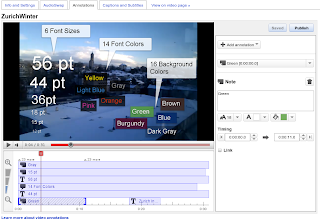
  • A brand new annotation editor - based on user feedback, we overhauled the annotation editor and moved most of the functionality to a new side panel to streamline annotation creation, editing and deletion while leaving the player less cluttered.
  • New annotation type - “Title” - Title annotations enable overlaying headlines, videos titles, credits and other “big text” on top of your video, just like you would with professional video editing tools.
  • New Font size options - you can now select from a combined set of six font sizes.
  • New color options - annotations are now available in 16 background colors and 14 font colors.

Annotations can be a very powerful creative tool and make videos that are engaging, informative and interactive; however it’s important to realize that overlay text and hotspots can also interrupt and distract viewers. Not every use of annotation is necessarily a good use - there is an art to it. This is why we published Tips and Suggestions on how to get more from your annotations while respecting viewers’ wishes and maintaining a small footprint.

Finally we’re discontinuing the Collaborative Annotations feature to make room for even more new features coming soon.

To start annotating your videos, go to My Videos and choose “Annotations” from the drop down menu next to the video you wish to annotate. For inspiration check out
this playlist and see some of our favorite annotated videos. Happy annotating.

Itamar Gilad, Product Manager, recently watched “The YouTube Radio! (Interactive)” and Aaron Bingham, Annotations Engineering Lead, recently watched “Felix’s Machines.”
More aboutAnnotations Updates - Now It’s Easier to Get Interactive

A Year of Interactive Video Annotations

Diposting oleh Greatest on Senin, 14 September 2009

"Choose a different ending" is an interactive video describing the life of a teenager trying to survive the slums of London. The story, which is shot from a first-person point of view, lets viewers control the hero’s actions (e.g. deciding whether or not he should take his knife to school). Only when the plot reaches one of its grim endings do you realize that the video, commissioned by the London Metropolitan Police, is actually a powerful tool in helping youngsters cope with some of the tough decisions they are faced growing up in a violent environment. This interactive video is a great example of how annotations on YouTube have evolved in just one year: what started as a small-scale experiment is now changing visual storytelling on the web.


If you've seen "Annotations Man," one of many user-created tutorials about annotations, you would have learned that interactive video annotations are a set of simple tools that enable you to add text and hyperlinks directly onto your videos. The feature was originally launched in the summer of 2008; since then, we've seen the featuring being put to use with increasing sophistication to:
  • Provide dynamic commentary: Basically, this means placing a layer of comments on a video; things like director comments, pet dubbing clips, and how-to tips for everything from origami to guitar lessons.
  • Add interactive links and menus: Many video-makers use the links to direct traffic to other videos and to create spatial video menus.
  • Create branching story-lines: Unlike the above two types, which maintain the individual video as the comprehensive story unit, this third group emphasizes a collection of videos organized in a hierarchical structure as a new format of storytelling. Here we find a wide spectrum of use cases, including interactive advertisements, murder mysteries and even wacky dating tips.

We really find it hard to imagine that all this happened in just one year, and can't wait to see how you might knock us out in 2010. So go ahead and choose your own ending…

Michael Fink, Software Engineer, recently favorited "Annotize me!"

More aboutA Year of Interactive Video Annotations

Adopt a Feature: All Hail MikeandToneRP

Diposting oleh Greatest on Senin, 07 September 2009

Lots of good news to report since we last spoke about Adopt a Feature v2. This round, the number of submissions to the program more than doubled -- 76 videos were made about annotations, tags, Quicklist, mobile uploads, the customized homepage and a few other features -- and in all they were viewed 407,994 times. Annotations were the most popular feature to adopt by far, and you had a lot of fun with it: KOHPelord literally brought an annotation to life to explain the feature, while DeStorm envisioned a superhero named "Annotation Man" to save the day.

But the most-viewed video of the bunch, and thus the winner of this edition of Adopt a Feature, was MikeandToneRP's exploration of tags, featuring an off-kilter "Megan Fox," viewed nearly 80K times. Congratulations, Mike! Look out for a YouTube T-shirt headed your way.

In addition, many current and past Adopt a Feature videos have found permanent, loving homes in our Help Center, where they can "give back" by enlightening anyone looking for more info. The list below covers just some of the places you'll find your tutorial videos helping other users out:
Hunter Walk, Director, Product Management, recently favorited "Metal Heart by Keith Loutit - in HD."
More aboutAdopt a Feature: All Hail MikeandToneRP

Adopt a Feature v2

Diposting oleh Greatest on Selasa, 30 Juni 2009

You may remember the inaugural edition of Adopt a Feature, for which you made videos about AudioSwap, Country Pulldown, Insight, Playlists, Quick Capture, and Subscriptions. These videos generated 818,698 views (they're all collected here) and a bunch of them even got featured on our homepage. At the end of the two month run, thecomputernerd01 was crowned the Adopt a Feature king, thanks to his zany explanation of how the country/language pulldown menus work -- a video that accounted for a third of all of the program's views. He also got this awesome T-shirt.

Josh took a break from ribbing his grandpa to tell you why you should get involved with Adopt a Feature v2.


In case you're still buzzing from Josh's high-energy onslaught, here's what you need to know: Make a video about any or all of the features on the list below (click on the name of the feature to get more information about it). Include the name of the feature and "adoptafeature" in the tags -- this is important; it's how we'll locate your video for inclusion on our channel and possibly on the YouTube homepage.

* Annotations
* Customize Your Homepage
* Tags
* Quicklist
* Mobile Upload

(By the way, for folks waiting to hear more about the roll-out of new channels, we should have an update in a few days.)

Posted by Hunter Walk, Director, Product Management
More aboutAdopt a Feature v2